Portfolio Shots
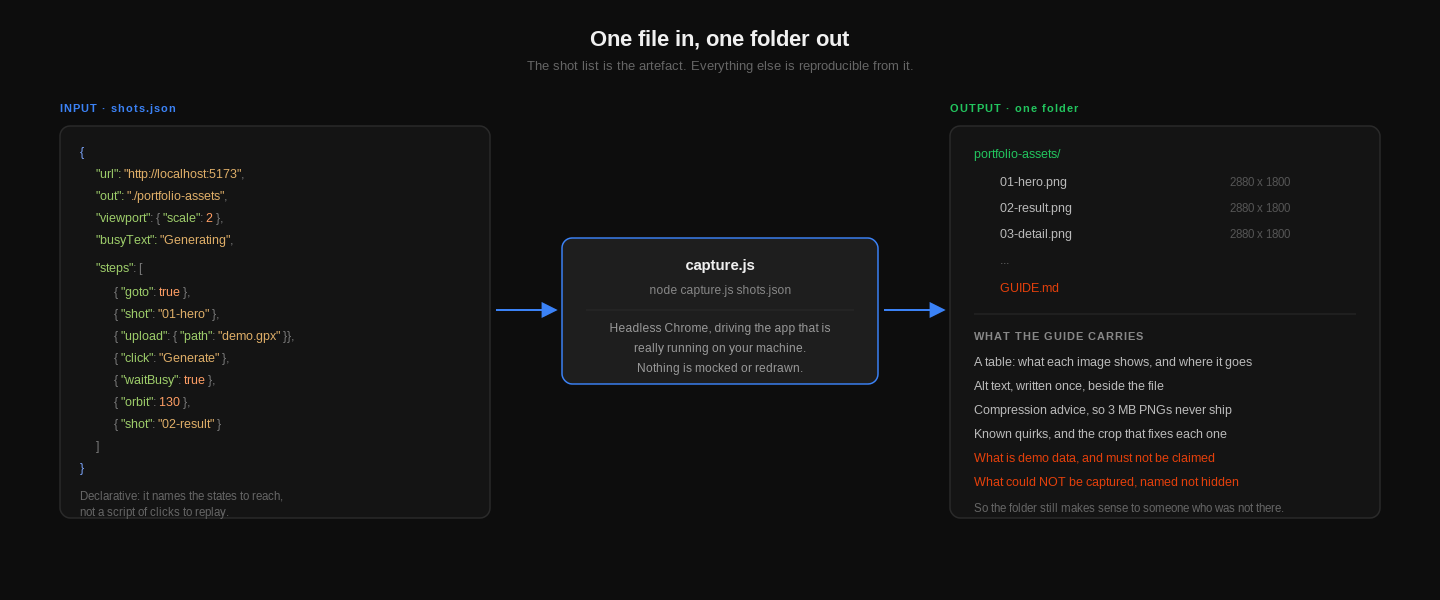
An open-source Claude Code skill that turns screenshotting an app into a build step. A shot list in JSON names the states worth capturing, a headless Chrome runner drives the real app into each one, and a GUIDE.md is written beside the images saying what every file is for, what its alt text is, and what must not be claimed about it. Seven of the screenshot packs on this site were produced by it.
The images are the part people actually look at
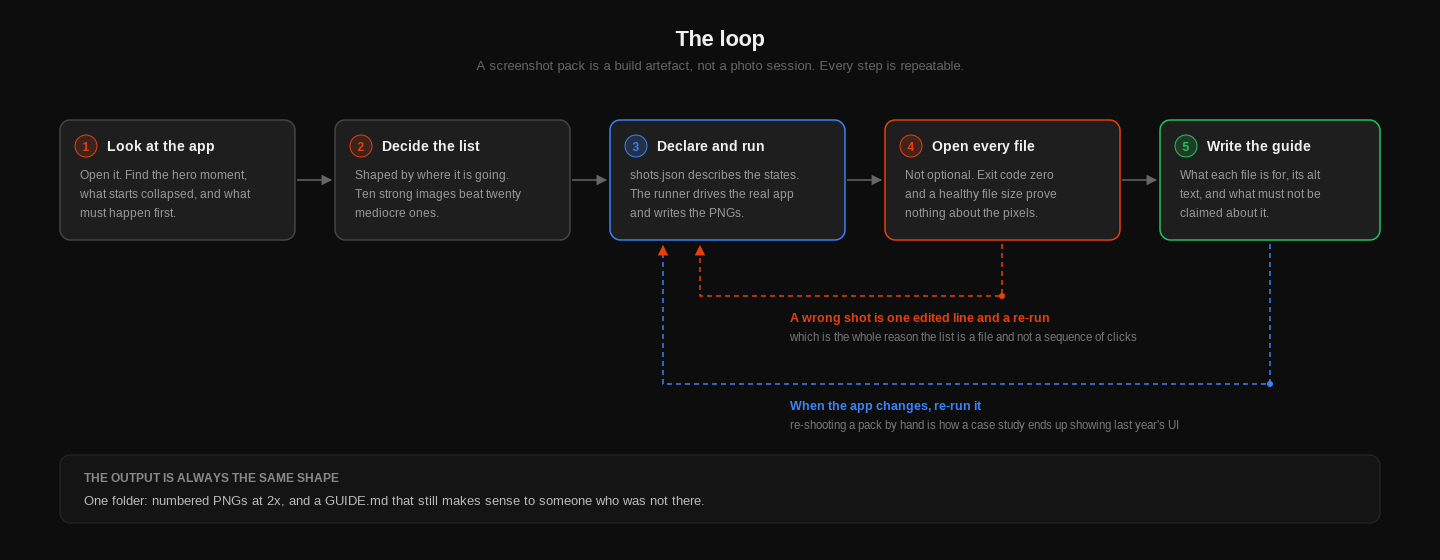
Nobody reads a case study top to bottom before deciding whether the person can build. They look at the pictures. Which makes it strange that screenshots are almost always the least rigorous thing in the whole exercise: taken by hand, once, at whatever moment the app happened to be in, and then slowly going out of date while the write-up around them is revised. The aim here was to move them to the same footing as the rest of the build, where a thing is described in a file and produced by running something.
A shot list is a file, not a memory
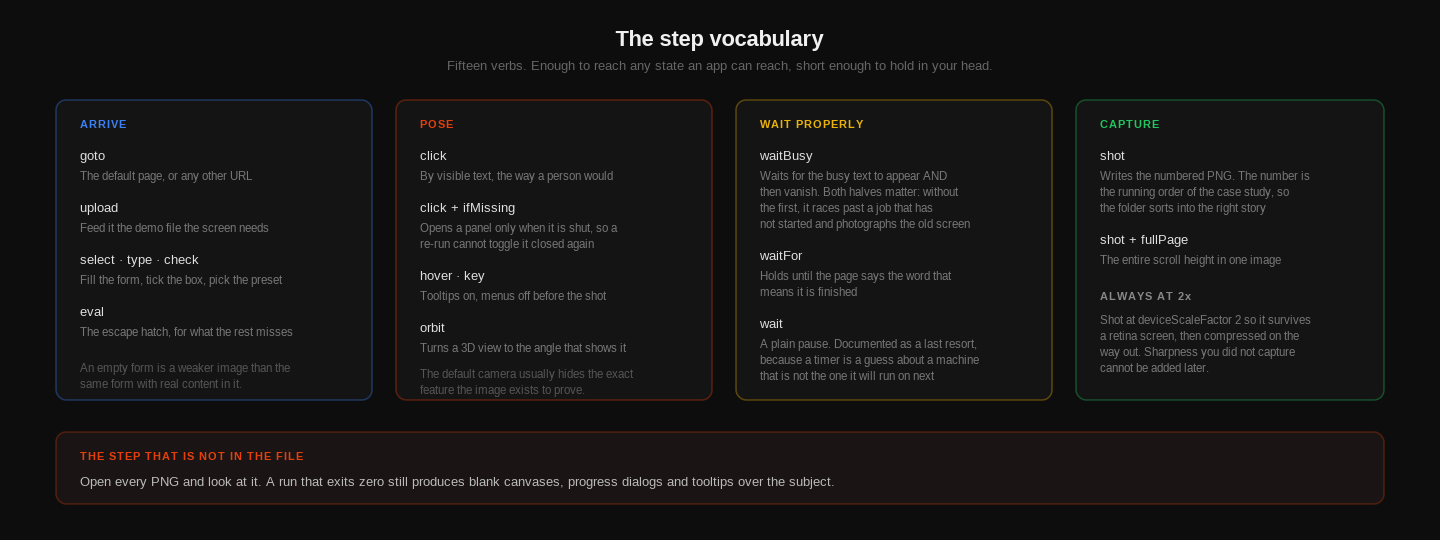
The input is a JSON list of states to reach: go here, upload this, press that, wait until it has finished, turn the model to this angle, take the picture. It is declarative on purpose. It is not a recording of clicks, it is a description of the screens that matter, which means it survives a layout change and can be read six months later by someone deciding whether a shot is still worth having. When the app changes you re-run it. Nobody re-shoots a pack by hand, which is the single reason a portfolio ends up showing last year's interface.
The failures are all silent ones
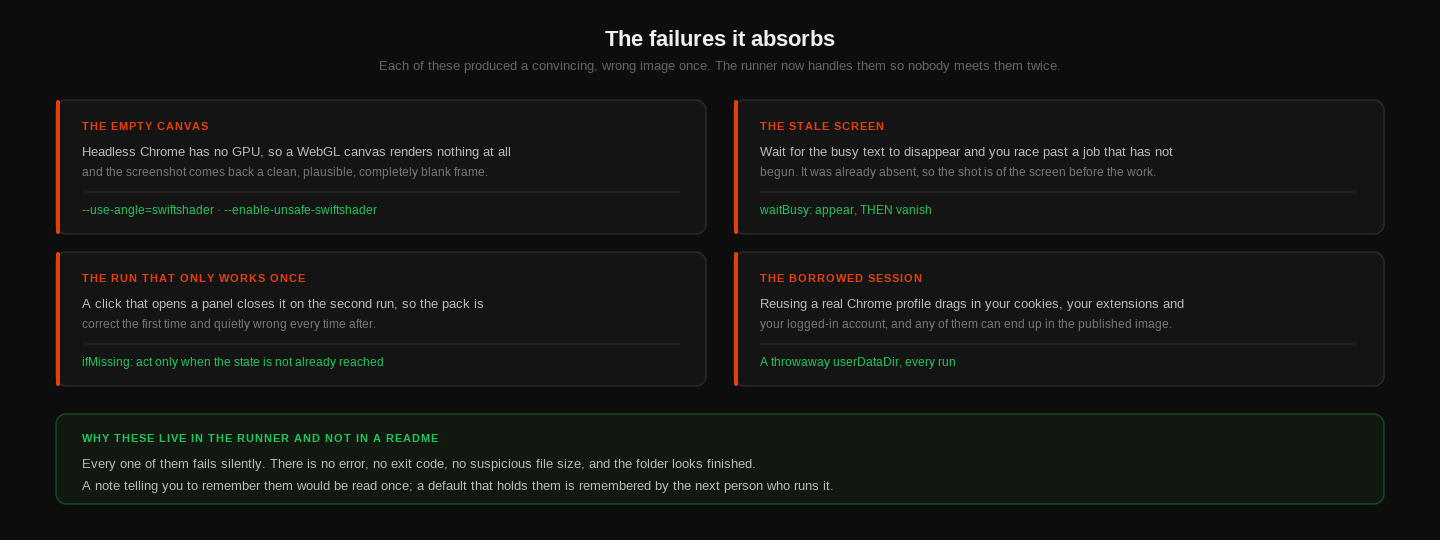
Four mistakes produced convincing, wrong images often enough to be worth building defences into the runner rather than writing them down. Headless Chrome has no GPU, so a WebGL canvas renders a clean empty frame unless SwiftShader is forced on. Waiting for a busy message to disappear races past a job that has not started yet, so the wait has to see it appear AND then vanish. A click that opens a panel closes it on the second run, so opening is conditional on the panel not already being open. And a real Chrome profile brings your cookies and your logged-in account into the picture, so every run gets a throwaway one. None of these raise an error; the folder looks finished either way.
The step that cannot be automated
Open every file and look at it. This is written into the skill as a required step, in the same tone as the rest, because the temptation to skip it is strong and the cost is a published portfolio with a progress dialog in it. A run that exits zero routinely produces a blank canvas, a tooltip across the subject, or a model photographed from the one angle where the feature being demonstrated is invisible. No exit code and no file size will tell you. The shot list is what makes looking cheap: a wrong image is one edited line and another run.
Half the deliverable is the guide
A folder of numbered PNGs is useless in a fortnight, because the reason each one exists lives only in the head of whoever took it. So the skill writes a GUIDE.md beside them: a table of what each image shows and where it belongs, alt text written once at the point it is still obvious, the compression to apply before publishing, and the known quirks with the exact crop that fixes each. It is the difference between a folder and a handover.
The honesty rules are the point
A portfolio is a claim about a person, and a reviewer who catches one overstated image discounts everything around it. So the rules are part of the skill rather than a matter of taste on the day: demo data has to be labelled as demo data, licence attribution stays in frame or is reproduced in the caption, a state the product cannot actually reach is never staged, and anything that could not be captured is named in the guide instead of quietly omitted. A gap you have written down is useful. A gap the reader finds for themselves is expensive.
Highlights
- An installable Claude Code skill, MIT licensed, published on GitHub.
- The shot list is JSON, so a changed app means a re-run rather than a re-shoot.
- Fifteen step verbs cover arriving at a state, posing it, waiting correctly, and capturing.
- waitBusy waits for the busy text to appear AND vanish, so a run cannot photograph the screen from before the work started.
- ifMissing makes opening a panel idempotent, so a second run is not the inverse of the first.
- SwiftShader is forced on, because a headless WebGL canvas otherwise returns a convincing empty frame.
- A throwaway browser profile every run, so no cookie or signed-in account reaches a published image.
- Every pack ships a GUIDE.md naming the demo data, the licence credits, and the shots that could not be taken.
The diagrams here are drawn rather than captured, because the skill has no interface to photograph, it is a command and a set of instructions. It did however take the screenshots for seven of the other case studies on this site, among them PEAK Operations, peakpk.store, the Auromations receptionist, OCR Prescription Analysis, the 3D Power BI dashboard, the Fabric pipeline and Game of Life.